Want to be more productive while working? Benefits of using a Treadmill

In today’s fast-paced world, the convential office setup is evolving rapidly, with health and productivity taking center stage.

Some say, sitting is the new smoking. And we’re sitting at least 8h per day (quite unhealthy 😉 ), so I was looking for an alternative. I’ve bought an height adjustable desk and also modified my hometrainer bike to fit directly below which worked quite well.

One day I saw some very interesting things, also in meetings I saw more and more colleagues with: a treadmill. They’re walking like 2h in the morning and after lunch while working. So they get their daily dose of movement, and also an increased productivity, which was quite strange at first to understand for me.

I researched a lot and want to tell you some of the benefits:

Embrace Wellness: Health Benefits of Treadmill Desks

Picture this: as you answer emails, brainstorm ideas, and dive into projects, your body is gently in motion. It’s more than just a picturesque scene – it’s a reality with a host of health advantages:

1. Energize Your Heart: The steady pace of walking on a treadmill keeps your heart happily engaged, contributing to a healthier cardiovascular system.

2. Bid Farewell to Sedentary Woes: Wave goodbye to prolonged periods of sitting! Treadmill desks help you break the shackles of sedentary habits that often lead to health concerns.

3. Calorie Burn in Action: As you walk, those extra calories are quietly bidding adieu. Treadmill desks become your secret ally in maintaining a healthy weight.

4. Nurture a Stronger Posture: Walking encourages a more upright posture, easing the strain on your back and shoulders. It’s like a mini spa day for your body.

5. Mental Clarity and Creativity: Movement boosts blood flow to the brain, enhancing focus and sparking creativity. Welcome a steady stream of bright ideas!

6. Stress Busters on the Move: Feel the day’s stress melt away with each step. Physical activity releases those wonderful endorphins, creating a serene mental space.

Bask in Productivity: How Treadmill Desks Amp Up Efficiency

But wait, there’s more! The benefits of a treadmill desk extend beyond health, sprinkling a touch of productivity magic:

1. Unleash Laser Focus: Walking while working enhances concentration and attentiveness, helping you navigate tasks with precision.

2. Time Management Maestro: The rhythm of walking encourages efficient time management. Say hello to a more structured workday!

3. A Hub of Creativity: The unhurried pace of a treadmill desk can trigger a waterfall of innovative thoughts, elevating your creative prowess.

4. Revitalize Your Spirits: Feeling sluggish? A stroll on your treadmill desk acts as a natural energy booster, revitalizing your spirits in the blink of an eye.

5. Inspire Work-Life Harmony: Integrating movement into your workday nudges you closer to achieving that elusive work-life balance, nurturing both your career and well-being.

6. Mood Enhancement: Bid adieu to the Monday blues. Physical activity elevates your mood, ensuring that each workday carries a sunny disposition.

Since I’m working in the homeoffice most of the time, I wanted to give it a try. First I was sceptical, but the benefits are stronger than my scepsis. I searched on, what a wonder, Amazon and found an interesting tradmill. I wanted a tradmill with a quite high speed so I am also able to run, but also to walk very chilled with cushioning pads (so it is more relaxing for the knees). There are many tradmills, but the one from icefox caught my attention.

icefox 2 in 1 Home Treadmill, 2.25HP Foldable Treadmill with Remote Control, 12km/h Walking Pad with Bluetooth Speaker LED Display Extended Running Belt Cushioning Pads

It has a remote control, I can use it with or without a bar, I can connect it with a security running belt and more.

But the best is: there’s currently a discount of 50% on the price! So be fast 😉

As an Amazon affiliate I earn from qualified sales. Content was written with support of AI.

6 Things You absolutely need when you travel and want (or need to) work

As an consultant and also with my side hustle, I have to travel and work a lot. For this I need some things I want to share with you today.

For my side hustle I work with a Microsoft Surface Laptop Studio. Since the Microsoft Notebooks are quite expensive, I want to protect it.

I bought the Smatree Laptop Case 14 (which is only compatible with Surface Laptop Studio 14.4) for the perfect protection while transporting.

Since the Surface Devices have touchscreens, I also want the screen to be safe. I use the Megoo Surface Laptop Studio Display Screen Protector. The installation was very easy, I can still see everything clear and its compatible with the Surface Slim Pen 2 I work a lot with.

But that’s not enough. Sometimes I’m able to work with multiple screens, hence I need a hub which allows multiple connections via one USB C connection. I’m totally satisfied with the Docking Station USB C Hub 3*Display- 10 in 1, Lemorele USB C Docking Station. It has Dual HDMI Adapter 4K, 3 USB 3.0/2.0, VGA, PD 100W, Audio, SD/TF, USB C HDMI, so enough for connections on the go.

To work more efficiently, I use the very nice tools from Logitech. For travelling I use the Logitech MX Keys Mini which allows to connect with multiple devices, as well as Logitech MX Master 3S. I really love these and also have the larger keyboard for my homeoffice.
To protect the keyboard on the go I use the case from Bright-Store and for the mouse I use the case from co2CREA.

But one, very essential thing is still missing! What, if I have to join a meeting, watch some videos or just hear some music to be most productive. I’m a big fan of JBL and use the JBL Tune 230 NC TWS. The noice cancellation is awesome! I can easily activate it with one fingertip and can work without any disturbance.

With these things I’m very productive on the go and get the most done, even when sitting in a café and enjoying an cappuccino while working.

Note: in this article are links to Amazon and as an Amazon affiliate, I earn from qualified sales.

Periodical Scheduled Reports: only send on Workdays in Business Times

In the project I’m currently working are multiple reports scheduled. Some of my colleagues receive more than 20 of those mails daily. Most of them on a periodical basis. Also on the weekend and in the night, where they weren’t required or even necessary, they only flood the mailbox. Some of them then asked me, how this can be adjusted so the reports will only be sent on the weekdays. I’ve therefore searched and adjusted a condition script to exclude the weekends. However, the script was sometimes working and sometimes not (it was correct though).

I’ve then searched more in detail and found something even better – a condition script to only send mails in a schedule AND in a specific time zone, since most of my colleagues are located all over the world and only a hand full in Germany.

The best on this solution: it’s suggested from ServiceNow! Not a script from the community or even developed on my own.

In the below list there’s the procedure how to use the condition script:
1. Create a Schedule (System Scheduler > Schedules), or use an existing Schedule in your system
2. Add the ‘Conditional’ and ‘Condition’ fields to your Scheduled Reports form
3. Check the ‘Conditional’ checkbox
4. Set ‘Run’ to Periodically, then set an hour interval you wish to have the report sent out with
5. In the ‘Condition’ field, use the following script (replace the timezone with your timezone, replace the 32-character sys_id with the sys_id of the Schedule you created – you can get that by right-clicking it in the Schedules list and selecting Copy sys_id

Script:

var s = new GlideSchedule("<sys_id of the scheudle>");
var gdt = new GlideDateTime();
s.isInSchedule(gdt, "<the target time zone>");

Example:

var s = new GlideSchedule("08fcd0830a0a0b2600079f56b1adb9ae");
var gdt = new GlideDateTime();
s.isInSchedule(gdt, "US/Pacific");

To get the list of schedules, you can use the below link (simply set your instance suffix) or use the application menu method:
https://<instance>.service-now.com/cmn_schedule_list.do
System Scheduler > Schedules > Schedules

Time zones are not available in a central table. They’re stored as choice list options. There are several ways how to access the available tables. You can use the below link (adjust the ServiceNow instance name):
https://<instance>.service-now.com/slushbucket_choice.do?sysparm_ref=sys_user.time_zone&sysparm_form=sys_choice&sysparm_dependent=&sysparm_stack=no

I hope this solution helps you and your colleagues as it helps me and my colleagues.

Related Links:

Quebec Release – what’s new on the Platform

It’s time, ServiceNow Quebec Release is here! And I have the latest Platform innovations for you. In this article, I’m covering some of the greatest new features available.

Today, Chuck Tomasi, Kreg Steppe and Jeremy Duncan from TechNow (ServiceNow) gave us a short but very interesting introduction to the new Quebec Release. If you are interested, try it on your own! Request your own PDI (personal developer instance) on the Developer Portal (all free).

Quebec Platform features:

UI Builder

With the UI Builder you can now design and personalize configurable workspaces and portals to improve the overall Now Experience! With the new designer, the ‘what you see is what you get’ approach immediately shows the final design and you can reuse the components you created, over and over again. It’s easier to configure and you have more possibilities. It also supports domain separated environments, so other entities will also benefit.

Data Classification

The new release allows you to increase the platform security wth data classification.
Data classification enables you to categorize fields as internal, restricted, confidential, etc. and lets you report very quickly on field categorization for regulatory compliance. It allows you also to manage fields via Rest and script APIs.

AI Search

With this improvement you’ll benefit from consumer-grade search experience, powered by AI. You (or your employees/customers) get relevant and actionable results, based on user context. Simply ask questions using natural, everyday language. One configuration allows you to reuse across different interactions. AI Search is now a native ServiceNow technology and available on all, Platform, Portal, and also Virtual Agent and Mobile Apps.

Process Optimization

This is part of the core platform, but only activated with the ITSM or CSM package. Process Optimization allows you to mine process flows to identify areas for improvement. Enable governance and controls based on process optimization roles. Track the business value of process improvements.

Virtual Agent enhancements

The Virtual Agent itself is also improved to allow you faster time to value with guided setup with recommendations and advanced authoring Tools. Improve business outcomes with automatically resolved incidents, actionable notifications and password reset while interacting and not even need to contact an agent. It also allows you to use AI-powered experiences with conversational analytics, NLU, workbench & intent discovery and AI search integration.

NLU Workbench

While NLU isn’t new, the NLU Workbench is. The Workbench allows you to manage models across apps and languages with a single unified view. You can create modules in sixteen languages quickly with dynamic vocabulary source tables and lists. Automatically identify topics to activate or build based on user data with intent Discovery.

Regression Framework

‘Regression Framework is part of Predictive Intelligence and is available with Pro or Enterprise packages. This new feature allows you to set better expectations with end users like, ‘based on workload, your could take X days to deliver’. You can estimate ranges with upper and lower values and improve planning by forecasting estimates.

Natural Language Query

This is not completely new, but completely improved. You can ask questions using natural, everyday language and get quick answers in the form of lists, values and charts. It’s very useful for ad hoc information. Easily filter and search your data for further outcome customization. You can now pin common or most used queries. Natural Language Query is now available in English, German, Japanese, Spanish and French and is part or a pro or analytics Q&A package.

Performance Analytics enhancements

One of the most useful improvements is the support for flexible calendars, like fiscal year requirements.

Reporting enhancements

Not only PA is improved, also the classic reporting gets an upgrade. Quickly perform calculations on specific fields while in report designer. Tailor reporting with multiple formatting options to highlight what’s most important.

Mobile Experience enhancements

The mobile apps also got new features with the Quebec release. As already mentions, AI Search is available on mobile, a smart and intuitive search experience across apps, people and workflows. Deeplink to seamlessly transitions to third-party apps with all relevant data coming to you. Card actions are also improved to reduce clicks and get work done quicker with dynamic on-card action prompts (like green checkmark or red x). In addition, the new version brings some new administrative improvements, such as a redundant logout and login to update metadata. With ITBM it’s also possible fo manage time sheets and also copy from another timesheet, like if you’re working for the same project all day to reduce effort.

Mobile Developer Tool enhancements

To improve mobile experience, also the Mobile Developer Tool was improved. With mobile Card Builder you can create custom templates and cards with presets and components in an intuitive designer. UI Rules (comparable with UI Policies) lets you apply field value calculations and UI styling to UI elements to simplify custom use cases. There is also a possibility for user impersonation, this makes developing mobile solutions easier.

IntegrationHub enhancements

Within IntegrationHub you’re now able to simplify inbound integrations with REST API trigger. You can also manage complex bi-directional process integrations with remote Sync. Perform data mapping with new modern UX for codeless ETL. Retrieve data easily with the JDBC data stream. Send one or more files to your instance with SFTP. Choose a specific MID server for your integration.

Flow Designer enhancements

Flow Designer got many improvements behind the scenes. The UX was revised and now resembles the workspace theme. Enhancements are made to OOTB flow actions with support for variable set and record producer. Greater developer support for performance, usability and security. When you create a new flow, you now get a guided tour which assists you in creating your flow. If you’re creating a flow and use the same actions multiple times, you can select them from the most recent action while adding a new action to the flow. You also have the chance to select the new action ‘Send notification’, this let’s you select one notification from the central notifications table and use it within your flow.

App customization

Within Studio, you can now customize scoped/OOTB or apps from the store to meet your requirements. However, not all apps are editable.

Paris Release Platform Features

Last Tuesday, Chuck Tomasi (Sr. Developer Evangelist, ServiceNow), Kreg Steppe (Program Manager, ServiceNow) and Jeremy Duncan (Platform Architect, ServiceNow)  announced in the TechNow podcast some of the upcoming Paris release platform features. This release is available by now with the early access program and in October for public.

I want to share some of the features with you and those are pretty cool! You can find all information of the upcoming release in the release notes.

You can try the new release and features in the developer portal and request your own PDI (Personal Developer Instance)
Some of the benefits of the developer portal:

  • Free personal developer instance
  • Early access to releases
  • Free learning plans
  • Script API documentation
  • Developer meet-up information
  • Developer events
  • Developer blog
  • Share content
  • Videos

The recording is now available on demand:
https://www.servicenow.com/events/on-demand-webinars.html

Please note, all features are in the safe harbour state and changes could affect.

Automated Test Framework (ATF)
Improved indexing
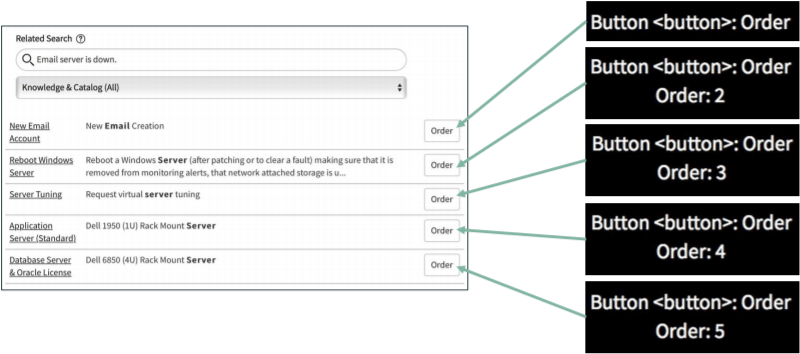
Buttons can now be indexed to select the right one.

Authentication

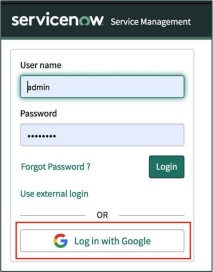
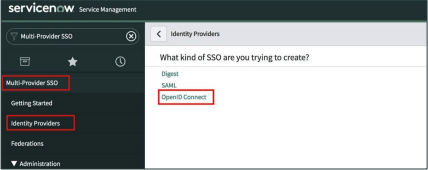
OpenID Connect SSO
OpenID Connect (OIDC) is an identity layer built on top of the Oauth protocol which provides a modern and intuitive SSO experience to you and your end users.

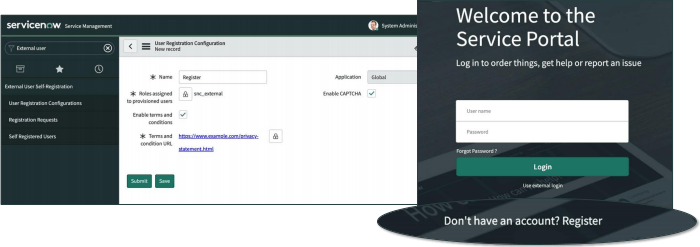
Self-Registration
External user self-registration enables a large group of users to register to a ServiceNow app without the help of an administrator.

Core Platform

Scoped data administration
With scoped data administration, administrators can now allow or disallow specific users to edit specific information within an application. Other users are not allowed to change those information.

Flow Designer

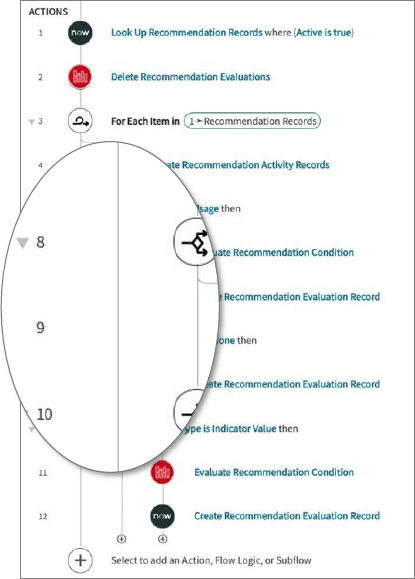
Order of Actions – Number
With the new release, the Actions in Flow Designer are now labled with an ongoing number, not longer dots for child actions. It’s easier now to identify the right action.

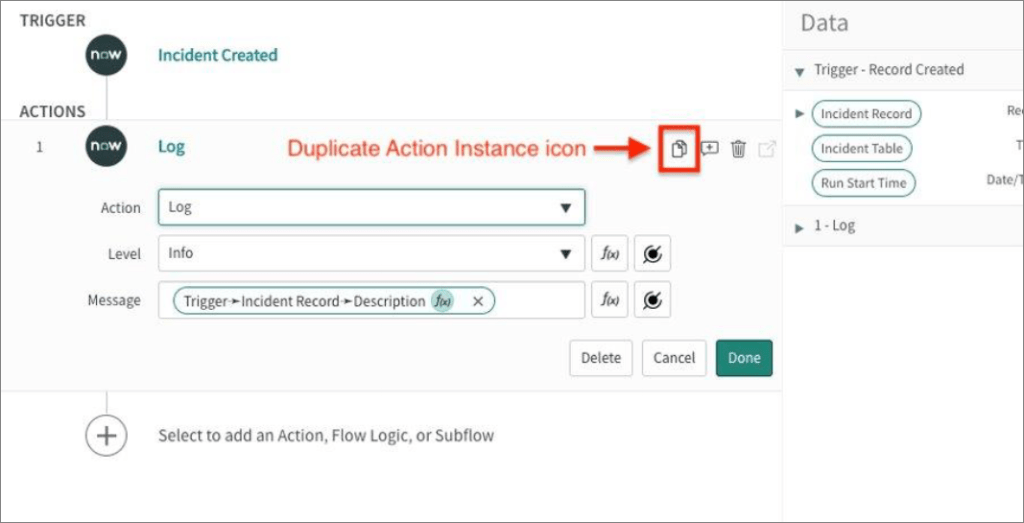
Duplicate Action Instance
Do you sometimes have to create multiple Actions which are nearly identical to each other? With the new icon next to Annotation and Trash Bin you can easily duplicate an Action, and the best is, it is already prefilled with the same Data Pills.

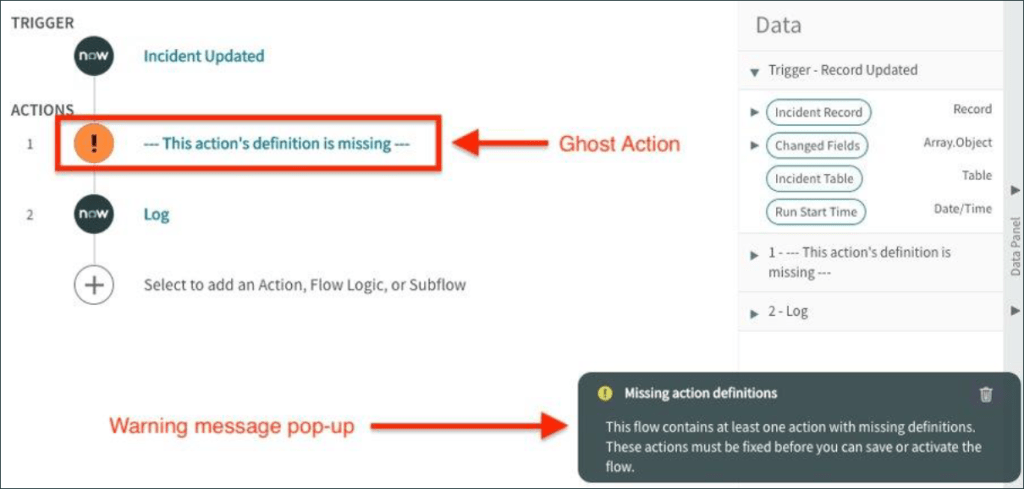
Ghost actions
With the new release, missing Spokes or Actions from an migrated Flow from your dev or test instance are now shown as a ‘Ghost Action’, also a message is displayed.

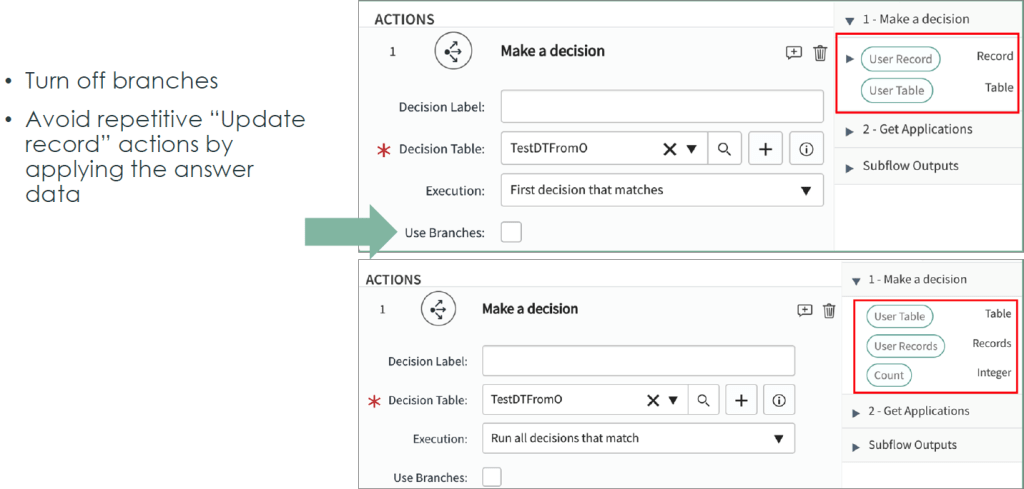
Make a decision
With a new flow logic, you are now able to easily make decisions based on certsin criterias.

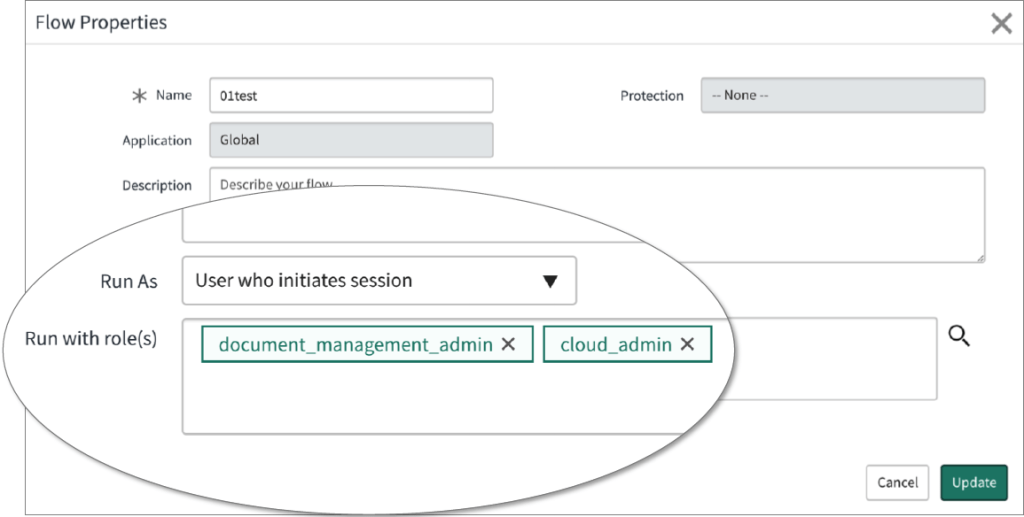
Run with roles
Flows can only be executed with an system user or by the user who initiates session, and also with the roles of this user? But what if the flow needs to execute something where the user don’t has access to? With an very cool improvement, you are now able to add some temporary roles to this user to enable those specific Actions.

Those roles don’t have to be licensed, since they are temporary.

Send SMS Action
With a new Action, you can now send SMS to users.

User Access Control Critertia
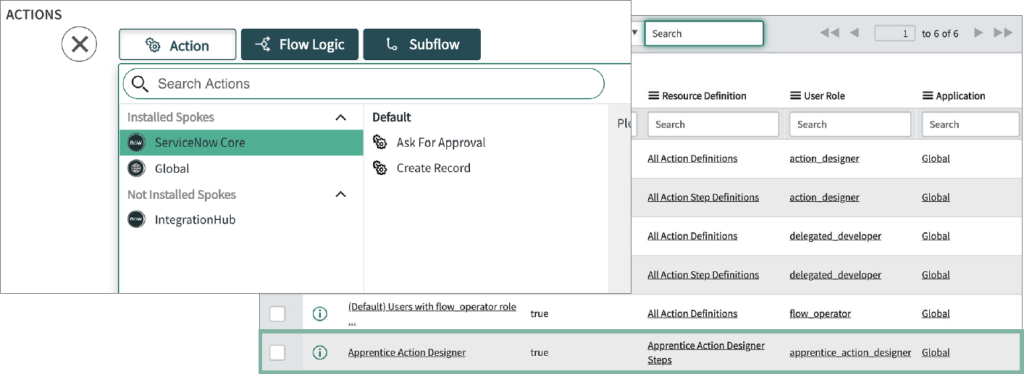
This is also a very nice new feature. It’s something like domain separation, but not directly. You know there are hundrets of spokes available. Maybe an administratot know most of them or at least knows how to deal with numerous spokes installed. But what if an additional contributor needs to build flows or at least add or configure some Actions? Not only the high number of potentially installed Spokes are dangerous, also some Actions. You now can set permissions to enable some contributors to specific spokes, so they for example can edit or add Actions for systems or departments for which they are experts.

To do so, you can set those permissions in the Flow Menu.

IntegrationHub

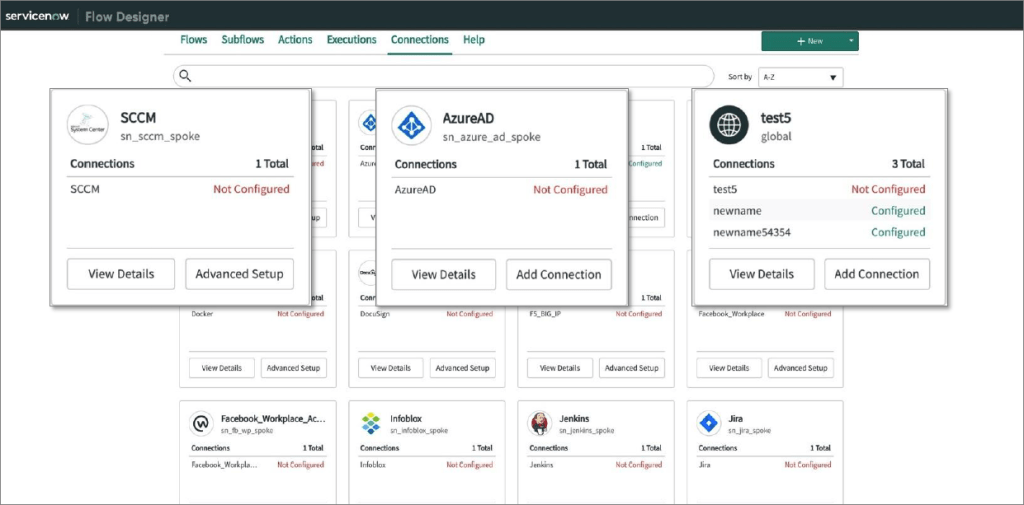
Integration Authentication
With IntegrationAuthentication, you can now create new credentials without exit the Flow.

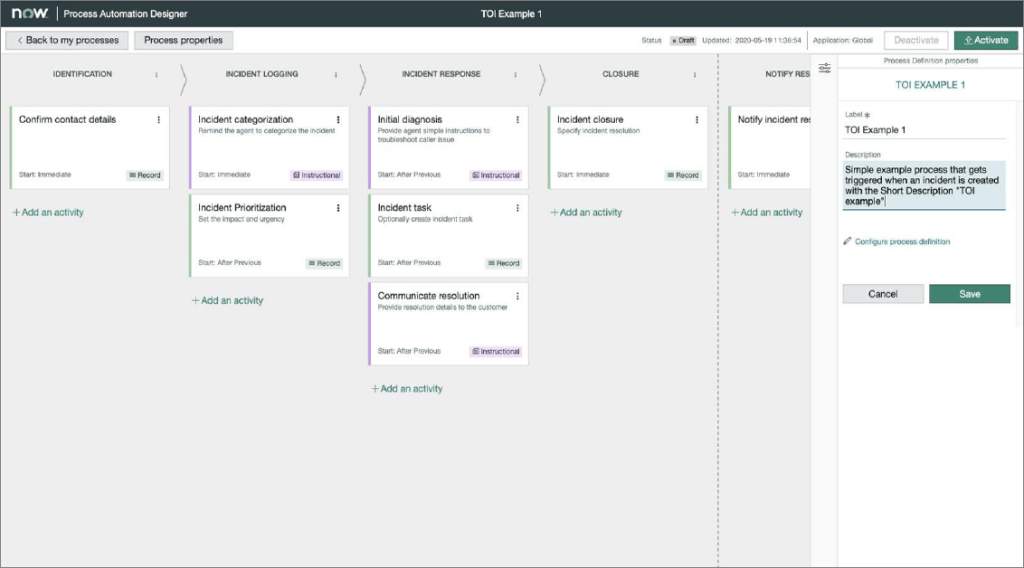
Process Automation Designer
Business Process Owners can now digitize,  visualize and manage end to end workflows to Business Services with an new Builder experience.

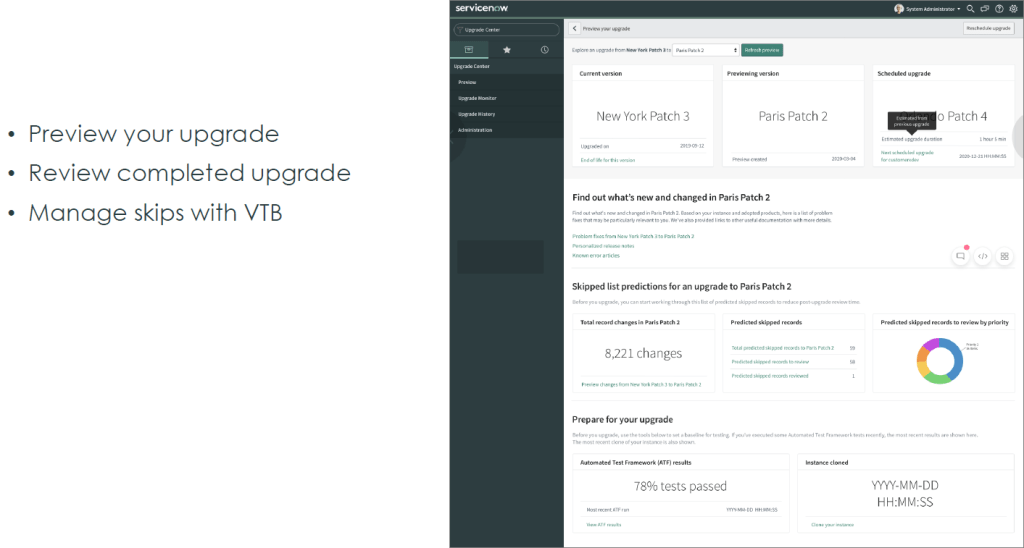
Upgrade Center
In the new Paris Release, there is a new Upgrade Center. Upgrades can be previewed or reviewed and you can manage skips with VTP.

This was only a short list of numerous new Platform Features in the Paris Release. Other cool improvements or coming features are in the Workspace, Studio, Playbook experience, Notifications, Platform backend, FlowAPI and FlowScriptAPI, Domain separation.

Referred Links
http://bit.ly/sn-break-point
https://docs.servicenow.com/bundle/paris-release-notes/page/release-notes/family-release-notes.html

TechNow:
http://bit.ly/servicenow-technow
Community link: https://community.servicenow.com/community?id=community_blog&sys_id=4d6eaeaddbd0dbc01dcaf3231f961964
YouTube: https://www.youtube.com/playlist?list=PLkGSnjw5y2U7HkJd7YkVtX93pA5pl8KDM

Now Create – Deliver Successful Projects

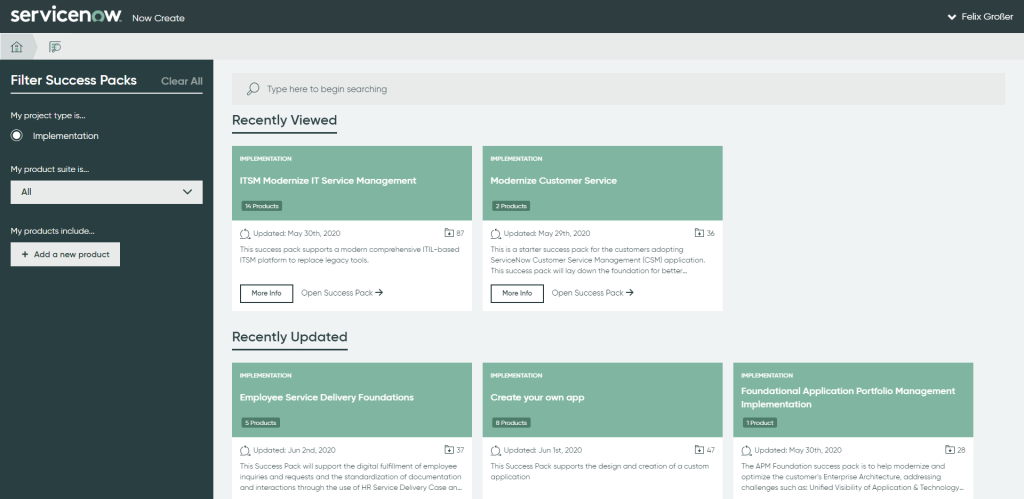
Now Create is a new Framework to provide guidance on how to deliver successful projects on the ServiceNow Platform, gained from the insights and learnings of thousands of successful projects.

With Now Create, you are able to find methodologies for implementation, upgrade, enhancement, and landscape optimization projects. Assets containing detailed product specific guidance are attached to the methodology right where you need them.

The system also provides project related templates to accelerate execution, such as project charter, project report, raid logs, and many others. In Now Create, this collection of methodology and assets is called a success pack. A success pack is designed to deliver a specific successful project outcome, for example, an ITSM implementation or CSM upgrade.

Who Benefits from Now Create?

Every single person involved in the scoping and delivery of a ServiceNow project can benefit from Now Create. It doesn’t matter how technical your role is or which organization you belong to. Now Create is designed for everyone.

Before starting your project, Now Create’s content will guide you to define activities, skills, and resources required for success. This will support the definition of business cases, as well as allowing customers, partners, and ServiceNow teams to optimize the combined team resourcing.

Now Create provides an intuitive and simple way to explore the steps for successful project execution. During the first ServiceNow project, Now Create will act as a great companion as you ramp up. For seasoned ServiceNow practitioners, Now Create’s vast library of detailed and evergreen leading practices will keep you at the top of your game.

The system’s structured processes and leading practice assets drive higher quality and more predictable results with a faster time to value. By removing uncertainty, Now Create also reduces anxiety withing project teams. All of this reduces project risk and creates amazing business outcomes.

How Now Create Works

Within Now Create you can search for the right success pack for your project. You can use the fi lters or text based search to locate  the right success pack and then dive in to learn about the details of it.

After you discovered the right success pack for you, you can explore this success pack. The project follows hybrid waterfall methodology with sequential project phases and exit gates coupled with agile scrum development in the execution phase.

To learn more about any of the tasks on the overview page, simply click into it, and you will be presented with the task level details telling you why this is executed and the risk of not executing it.

On the Success Pack Overview page, you also can choose to download the success pack for loading into ServiceNow’s ITBM PPM product or other project execution tools.

How can I Access Now Create?

Now Create is part of the Now Learning Portal. However it can’t be found easily on the homepage, so I would recommend to directly access the Now Create homepage by visiting https://nowlearning.service-now.com/nowcreate

ServiceNow and Generation Z – the perfect fit?

Generation Z. Most people associate it with a ‘lazy’, ‘difficult’ or simply ‘another’ generation. They are considered disinterested and addicted to smartphones. What happens to the world of working when this generation enters?

Let’s take a closer look at the Generation Z. It extends mainly between the years 1997 to 2012, in which they were born. The first ones have already entered into the world of working, while the others will not enter the working world for a few years.

But: what is important to the Generation Z?

For most of them, it’s not work, a steep career or financial wealth that is important, but time for the family, personal freedom, self-fulfillment and, of course, having fun in life is.

They don’t want to spend a lot of time at work with manual processes, and they don’t want to rack their brains over open tasks. They want to live a relaxed life and experience many exciting things – and all this without the stress of work.

The first ‘digital natives’ – that describes it quite well. Almost everyone in the Generation Z has been involved with digital media since childhood and has been influenced by it – whether through television, the Internet, smartphones, etc. – so they are ‘fit’ in the new technologies.

They are more than familiar with the media. They know how to work efficiently with notebooks, smartphones, apps and co. Most of them ask themselves very early on when they start something ‘can’t this be done by smartphone?’. And it is exactly this thought that makes them masters of digitalization!

What does this have to do with ServiceNow? Very simple: ServiceNow wants to make working life easier in many areas due to the motto ‘make work, work better for people’. Who, if not Generation Z, would be best suited for this? ServiceNow offers a modern platform with extensive functionalities. Machine Learning, Artificial Intelligence, Flows, Workflows, Mobile Apps and numerous integrations are only a small list of the platform capabilities.

Working life is becoming more and more mobile. Everything has to be done on the go. An unbelievable amount has to be done in an unbelievably short time. By touching digital media at an early age, Generation Z fits perfectly with ServiceNow because both share the same passion.

I’m very excited to see how Generation Z makes working life easier with ServiceNow.

Review: ServiceNow: the Now Platform® Orlando Product Release Broadcast

Last Thursday the latest ServiceNow version Orlando was officially launched. Here you will find the most important information in case you were not able to attend or want to read the content again.

In the latest release Orlando, ServiceNow introduced more than 800 new features. The most important ones I would like to introduce you briefly:

  • Now Intelligence
  • Analytics Q&A
  • Mobile Branding
  • Mobile Analytics
  • Now Experience
  • ServiceNow Extension for VS Code

Now Intelligence

In the new release, everything is about intelligence. AI is still an unfulfilled promise. Everyone is talking about it but nobody knows how to address the topic. So ServiceNow has fulfilled that promise. True to the motto ‘Intelligence done right: Making work better for you’. Now Intelligence is now behind most applications.

Analytics Q&A (limted access)

What do you think when you read this? Q&A to the Analytics Application? That’s wrong. Analytics is a very interesting topic for the high management level, which needs fast reports and has no time to create them.

The trick is, you enter what information you are looking for in a search field and the Analytics Q&A application generates the required report.

Mobile Branding

With the Orlando release ServiceNow has responded to many customer requirements. One if the requirements is to adapt the available mobile applications. Not only the mobile theme colors can be customized, but also the app name, app description, app icon and splash screen image. With the new release, MAM (Mobile App Management) support is available.

Mobile Analytics

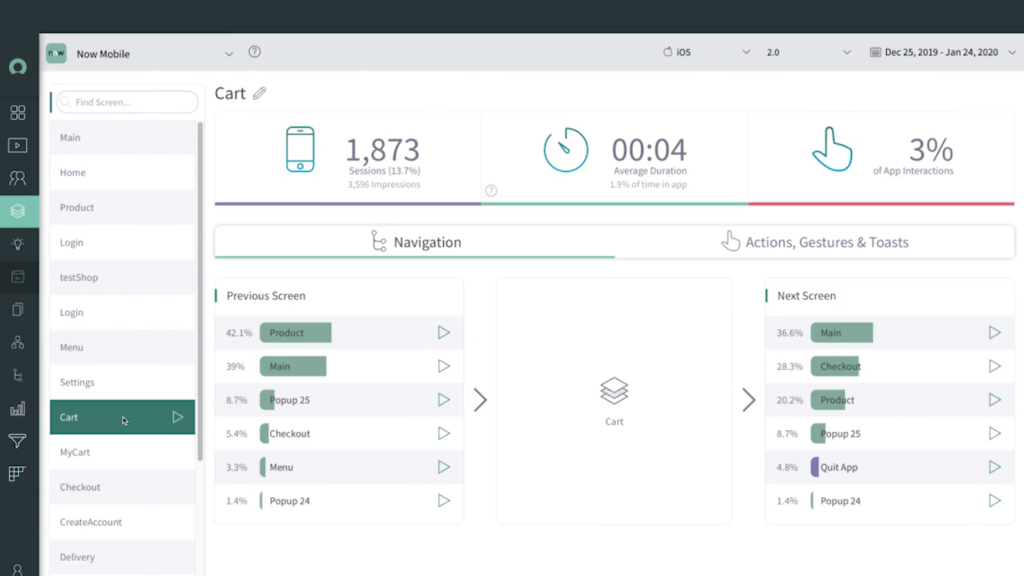
With the new release ServiceNow also introduces a possibility to check user data of mobile applications and thus further improve the stability and performance of the applications.

The ServiceNow Mobile Analytics application provides dashboard views to monitor key performance indicators for mobile application users created with the ServiceNow mobile platform. Visualize metrics and interactions to better understand the user experience and create more intuitive trips for your users.

Now Experience

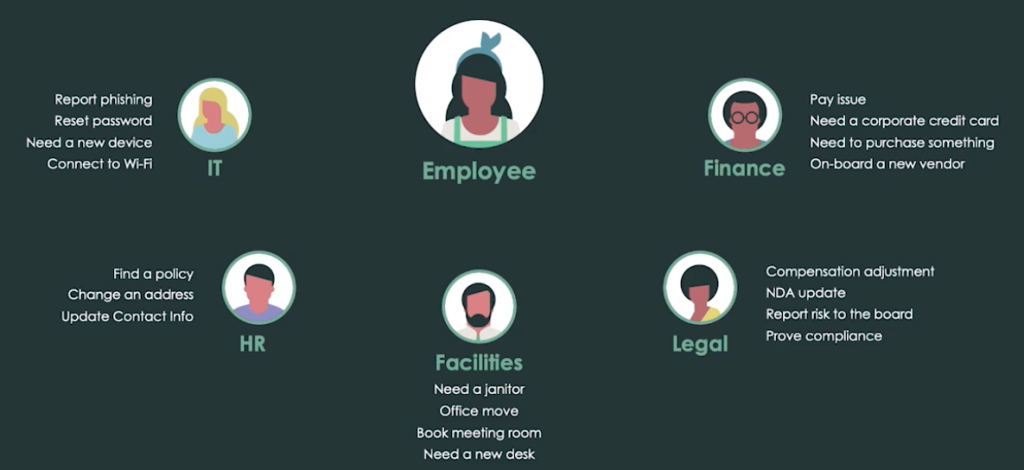
Today the experience of the employees is broken. Employees have to navigate across several departments to do simple things.

The IT department is responsible for things like connecting to the Internet, needing a new device, resetting the password and much more. The HR department provides policies, changes the address and updates contact information. Facilities organizes office moves, books meeting rooms, a new desk. The Legal Department is responsible for providing evidence of compliance, reporting risks to the Board of Directors. The finance department takes care of payment problems, company credit cards, purchase of various utensils.

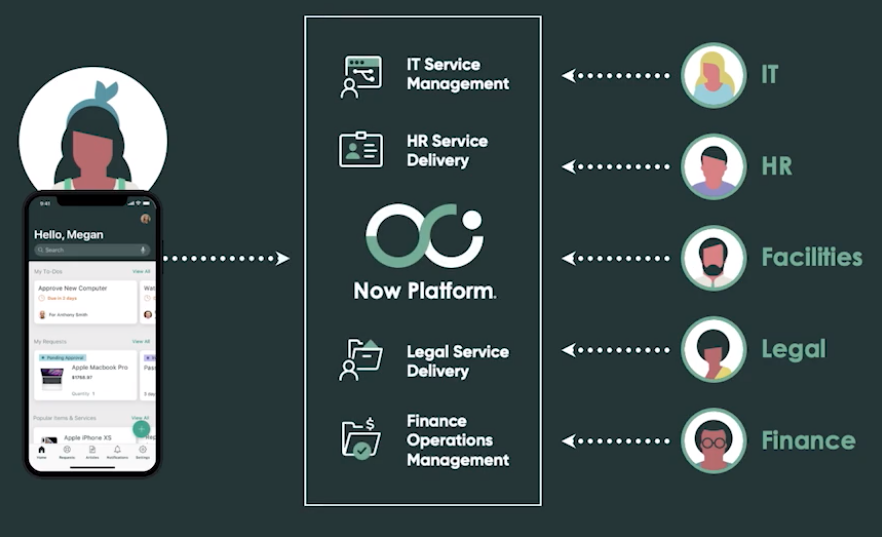
ServiceNow Employee Workflows transform the employee experience. How? ServiceNow combines everything in one platform – not only via website, but also via smartphone. This makes it easier for all employees to get things done, find information or whatever needs to be done.

ServiceNow Extension for VS Code

ServiceNow already provided an extension for Microsoft Visual Studio Code in the past. With the new release, this extension has been further improved.

From now on you can develop offline. As soon as an internet connection is available, the changes can be applied.  The extension also provides a 2-way-sync between VS Code and the ServiceNow instance. Furthermore, the extension provides code suggestions to use the correct syntax.

What is ServiceNow?

ServiceNow is an aPaaS (Application Platform as a Service) model and is the fastest growing enterprise cloud platform. It provides the customers a modern platform with extensive functions and several integrations. With the modern platform, workflows can be easily created to automate several business processes to make work easy. 

Now Platform®  

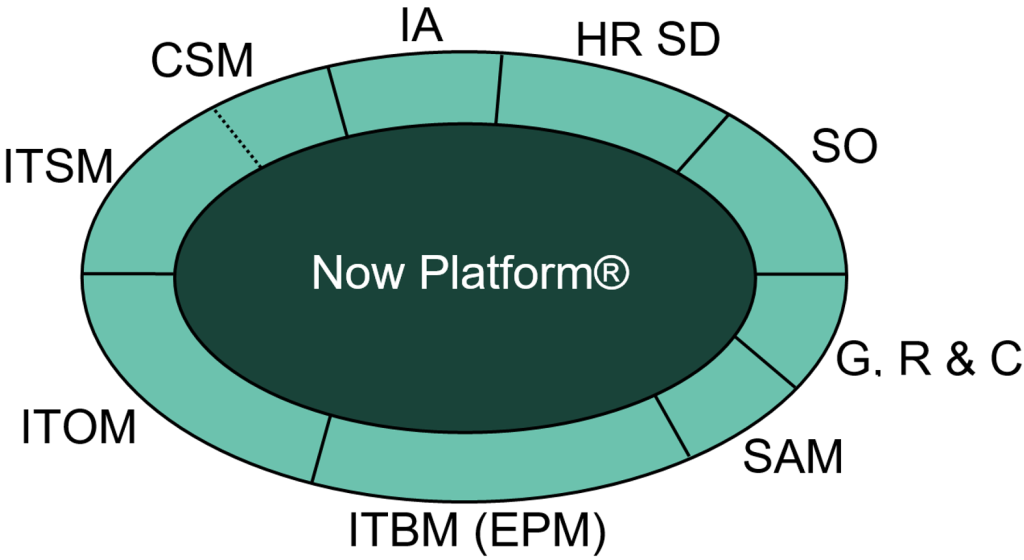
The Now Platform® delivers a System of Action for the enterprise. Using a single data model, it’s easy to create contextual workflows and automate any business process.  

Anyone, from the business user to professional developer, can easily build applications at lightning speed. Any application user on the Now Platform® can make requests through the service catalogues, find information in common knowledge bases, and be notified about the actions and information they care about the most. Departments, work groups, and even devices can assign, prioritize, collaborate, get down to root cause issues, and intelligently orchestrate actions. Now, makes your business move faster. 

ServiceNow key products 

  • IT Service Management: With the IT Service Management (ITSM) solution you are able to manage and deliver services to your users through a modern, single cloud-based platform. The ITSM suite offers features used by your IT Service Desk to manage the ITIL processes such as Incident Management, Change and Release Management, Problem Management, Service Level Management, Service Catalog, Knowledge Management, and Configuration and Asset Management along with features like reporting and administration, which are extended across other features as well.

Applications: Incident Management, Problem Management, Change Management, Release Management, Asset Management, Cost Management, CSI Management, Walk Up Management

  • Customer Service Management: Customer Service Management (CSM) is the pendant to the ITSM application. While ITSM is used for internal purposes, CSM is used for external use. CSM is used to resolve complex issues end-to-end. Problems can be fixed proactively and drive action to solve common requests more quickly and efficiently.

Applications: Customer Service Management, Communities, Field Service Management

  • Intelligent Applications: Intelligent applications are self developed applications, custom apps. This is now included in the Now Platform®. This solution includes Service Portal Designer, Studio (the developer interface), Delegated Development and Automated Testing.

Applications: Service Portal Designer, Studio, Delegated Development, Automated Testing

  • HR Service Delivery: HR Service Delivery is one of the key trends of ’20. With HR Service Delivery, ServiceNow wants to improve the employee satisfaction and make work more efficiently. Most of the HR employees are burdened by manual processes. Onboarding and Transition is a important topic as well. In this application all departments of the onboarding process are involved to improve the overall experience.

Applications: Case & Knowledge Management, Onboarding & Transition, Employee Service Center,  Employee Document

  • Security Operations: ServiceNow Security Operation brings incident data from your security tools into a structured response engine that uses intelligent workflows, automation, and a deep connection with IT to prioritize and resolve threats based on the impact they pose to your organization. So it provides your company a solution for security incident response, work through quickly and process all incoming signals onto a heatmap. You can also ask a anonymous community (trusted security circles) of several companies to solve your security issue. You are also able to discover all your systems to get data for current patches, event management and libraries to check whether a new patch is available or not.

Applications: Security Incident Response, Vulnerability Response, Threat Intel, Trusted Security Circles

  • Governance, Risk & Compliance: With this suite, automation of policies and live cycles of several services is possible. You can respond to business risks in real time, connect security and IT with an integrated risk program offering continuous monitoring, prioritization, and automation. Vendor management is possible as well to manage live cycles of the vendors and weight up how reliable a vendor is.

Applications: Vendor Risk Management, Audit Management, Policy & Compliance Management, Risk Management

  • Software Asset Management: ServiceNow started in this area three years ago and it’s the only solution which really saves costs. With Software Distribution, License Change Projections and Software Asset Management, every installed and licensed software can be identified on every client or server. With this information, companies are able to identify how many licenses are used, used to much or not exhausted at all. Unused licenses can be returned to the vendor to save those costs.

Applications: Software Distribution, License Change Projections, Software Asset Management

  • IT Business Management: ITBM is the most flexible/agile solution of ServiceNow. This suite will soon be renamed to Enterprise Portfolio Management. EPM is a more suitable term since it better describes the functions. Project Management isn’t only relevant for IT but for the entire company, for this, ITBM or soon EPM is used. All important parts of the classic project management is included and is strongly oriented towards agile project management.

Applications: App Portfolio, Demand, Resource, Project Portfolio, Agile Dev, Test Management, Financial Planning,  Financial Modeling & Charging

  • IT Operations Management: The ITOM suite is the heart of ServiceNow, right after the Now Platform. With this suite, you are able to discover every system in your network environment and map services. Now you are able to understand processes, the correlation between assets and the whole infrastructure. This is the base for event management. So if for example outlook doesn’t work anymore on a device, you can identify all systems involved to detect the error and resolve it. Also with Cloud Management you can for example provision Microsoft Azure resources or identify cost factors.

Applications: Event Management, Operational Intel, Service Mapping, Discovery, Orchestration, Cloud Management

  • Now Platform: The Now platform is the real heart of ServiceNow. ServiceNow is based on a CMDB. The CMDB is filled by discovery. With this CMDB you have a single source of truth where all CI’s are managed. But the Now Platform offers out-of-the-box several features as well.  Some of them are Virtual Agent, Notifications, Push-notifications, mobile Apps, Visual task boards, Flow Designer, Workflows and much more.

Applications: Service Portal, Virtual Agent, Knowledge Management, Notify, Push, Mobile, Guided Tours, Supervised Machine Learning, Anomaly Detection, Actionable Analytics, Time Series Database, Peer Benchmarking, Connect, Visual Task Board, Service Catalog, CMDB, Orchestration, Integration Hub, Flow Designer, Workflow

Capabilities 

  • Authentication: Single sign-on (SSO) feature is the essence of any tool and ServiceNow is no different. This tool has multiple provider SSO features. An organization can use several SSO IDPs (Identity Providers) to manage authentication. SSO enables a user to login into the application without providing any UserID or password. Hence it uses the Windows ID and password. 
  • LDAP: Companies can use Active Directory for various purposes. Be it providing access to applications or maintaining Outlook Distribution list; there are many. The LDAP integration is a piece of cake for ServiceNow tool, and the part is that you do not have to code anything. Everything is a simple configuration. 
  • Orchestration: ServiceNow provides the capability of orchestrating or automating simple or complex tasks on remote servers. One Orchestration is implemented in an IT company, the entire work requires less skill and labor. It can automate systems which are listed in the Integrations section. 
  • Web Services: The Platform provides the capability of publishing or consuming API at the same time. SOAP, WSDL or REST API are protocols supported. You can either create codeless API or scripted ones. 
  • Enterprise Portal: One of the most important requirements for any organization is to have a web portal where users can request for access, service or support. ServicePortal has the capability of giving wings to different organizations. Today Enterprises are developing their ServicePortal to showcase their ServiceNow capabilities. ServicePortal also replaces CMS site which was the old version of portal but it does not have a capability like a Service Portal.  
  • Mobile Ready: Today most of the people would want an enterprise application/service/solution to be mobile enabled. They need the ability to make changes on the go. ServiceNow makes it possible. ServiceNow forms and applications are mobile friendly and can be published directly to the mobile without specific development done for mobile. ServiceNow provides the web-based application for the mobile and a mobile native app for iOS and Android. 

Integrations 

Integrations are licensed by different packets. 

  • API 
  • REST 
  • SOAP 
  • SSH 
  • PowerShell 
  • JDBC 
  • XML 
  • JSON 
  • Microsoft Teams 
  • Workplace by Facebook 
  • Azure DevOps 
  • Docker 
  • Jira 
  • Kubernetes 
  • Twitter 
  • Google Cloud translator 
  • Microsoft AD 
  • Microsoft Azure AD 
  • Microsoft Dynamics CRM 
  • Microsoft Exchange 
  • Adobe Experience Platform 
  • Microsoft SCCM 
  • Salesforce 
  • … 

Q2’20 SAP: 

  • Ariba 
  • Business Suite 
  • Fieldglass 
  • S4/Hana 
  • Concur 
  • … 

Hosting 

The customer instances are hosted in ServiceNow’s own datacenters which are shown in the image below. Two datacenters are combined to a datacenter pair for reliability. For a small number of customers with special requirements, an onsite implementation is possible. 

The German datacenters are located in Dusseldorf and Frankfurt Main.